Key processes trigerred by Sales team are as given below:
- Asset Accounting
- Taxation
- Cash & Bank: Variant - Bank Accounting
Key activites that need to be performed in the given sequence are as given below:
Asset Accounting
A. Summary Activities
| Activity |
Executed by |
Navigation |
Link |
| Asset Retirement |
Finance Manager |
Home > Assets > Asset |
Click Here |
| Asset depreciation schedule |
Finance Manager |
Home > Assets > Asset |
Click Here |
B. Detailed Process: Asset Capitalization
| Activity |
Executed by |
Navigation |
Link |
| Asset Creation (CWIP) |
Finance Manager |
Home > Go to Asset Module > Click on Asset |
Click Here |
| Material Request Creation |
General Administrator |
Home > Buying Module > Material Request |
Click Here |
| Approval Process |
As per Approval Matrix |
Approval Workflow |
Link to be updated |
| Material Request Submit |
As per Approval Matrix |
Home > Buying Module > Approved Material Request |
Click Here |
| Purchase Order Creation |
General Administrator, Purchase User |
Home > Buying Module > Purchase Order (via Material Request / Supplier Quotation) |
Click Here |
| Purchase Receipt |
General Administrator, Purchase User, Finance Manager |
Home > Buying Module > Purchase Order > Purchase Receipt |
Click Here |
| Asset Creation |
Finance Manager |
Auto creation of asset on Purchase Receipt Submit |
Click Here |
| Asset Master Update |
Finance Manager |
Home > Asset Module > Asset |
Click Here |
| Purchase Invoice Creation |
General Administrator, Purchase User |
Home > Buying Module > Purchase Invoice |
Click Here |
| Receiving Payment Voucher from Respective Department/GA |
Finance Team (AP) |
Offline |
- |
| Purchase Invoice Verification & Submit |
Accounts Executive - Payable |
Home > Buying Module > Purchase Invoice |
Click Here |
| Payment Request Creation |
General Administrator, Purchase User |
Home > Buying Module > Purchase Invoice > Create > Payment Request |
Click Here |
| Outgoing Bank Entry Creation |
Accounts Executive - Payable |
Home > Accounting Module > Payables > Bank Entry > New |
Click Here |
| Payment Reconciliation |
Accounts Executive - Payable, Finance Manager |
Home > Accounting Module > Payables > Payment Reconciliation |
Click Here |
| New Asset Capitalization |
Accounts Executive - Payable, Finance Manager |
Home > Asset Module > Asset > Asset Capitalization > New |
Click Here |
Taxation
| Activity |
Executed by |
Navigation |
Link |
| Purchase Invoice Verification & Submit |
AP Executive / Finance Manager |
Home > Go to Buying Module > Go to Purchase Invoice |
Click Here |
| Payment entry JV against billing ID sent by the Tax Consultant |
Tax Consultant / Finance Manager |
Home > Accounting > Journal Entry |
Click Here |
Cash & Bank
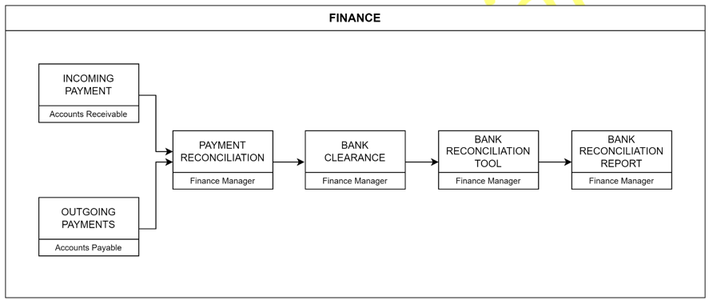
| Activity |
Executed by |
Navigation |
Link |
| Payment Reconciliation |
Finance Manager |
Home > Accounting Module > Payment Reconciliation |
Click Here |
| Bank Clearance |
Finance Manager |
Home > Accounting Module > Bank Clearance |
Click Here |
| Bank Statement Import |
Finance Manager |
Home > Accounting > Bank Statement Import |
Click Here |
| Bank Reconciliation Tool Usage |
Finance Manager |
Home > Accounting Module > Bank Reconciliation Tool |
Click Here |
| Bank Reconciliation Report Generation |
Finance Manager |
Home > Accounting Module > Reports > Bank Reconciliation Report |
Click Here |